

AI has moved from a “nice to have” to the backbone of modern accounting. This guide cuts through the hype — here is exactly which tools to use, for which job, and what each one actually costs.
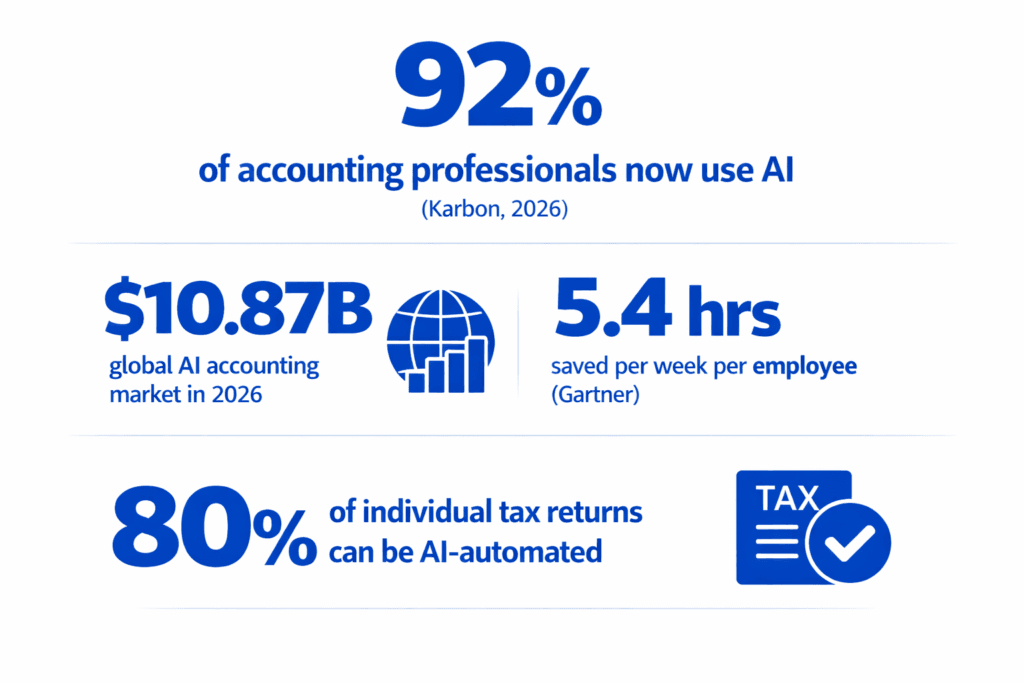
Table Of Contents
Why AI, why now?
For decades, accounting meant long hours, manual entry, and spreadsheets. That era is over. AI adoption in accounting firms jumped from 9% to 41% in a single year, according to the 2025 Wolters Kluwer Future Ready Accountant report. By 2026, that number has reached 92% globally.
The shift is not just about saving time on data entry. AI is enabling a fundamental rethink of the accountant’s role — from number-cruncher to strategic advisor. Platforms now automate reconciliation, fraud detection, tax research, and financial forecasting end-to-end. Firms report over 80% automation of individual tax return preparation, and audit teams are cutting document analysis time by 50% or more.
The business case is clear: AI-powered invoice processing reaches 99% accuracy versus 85-90% for manual processes. Each manual error costs about $53 to fix before compliance penalties. For high-volume firms, the savings are immediate and compounding.
Industry warning
Thomson Reuters research warns that firms without an AI strategy risk falling irreparably behind within three years. Your competitors are automating right now.
The 6 categories of AI tools accountants need
Before picking tools, understand what job you need done. AI in accounting falls into six distinct categories — each solving a different problem.
Bookkeeping & Reconciliation
Auto-categorisation, transaction matching, GL coding, real-time books without manual entry
Tax Compliance & Research
Multi-jurisdiction tax calculation, filing automation, IRS research, deduction optimisation.
Audit & Fraud Detection
100% transaction review, anomaly detection, evidence cross-referencing, audit readiness.
Financial Reporting & FP&A
Auto-generated commentary, live dashboards, cash flow forecasting, variance analysis.
Document Intelligence
Invoice OCR, receipt scanning, contract extraction, lease abstraction.
Practice Management
Workflow automation, client communication, task allocation, capacity planning.
Best AI tools for bookkeeping & reconciliation
Bookkeeping is where most accountants start with AI — and where the time savings are fastest. The tools below handle categorisation, reconciliation, and month-end close with minimal human intervention.
#1 QuickBooks Online (with Intuit Assist) – Best All-Rounder
- Bookkeeping
- Payroll
- Tax filing
- SMB
The market standard for small-to-mid-sized firms, now supercharged with Intuit Assist — a generative AI layer that auto-categorises transactions, forecasts cash flow, and flags anomalies. With 750+ integrations and payroll tax automation across multiple states, it remains the default starting point for most CPA firms.
Pros
- 750+ integrations
- Multi-state payroll tax automation
- Mobile receipt scanning
- Familiar UI — minimal training
Cons
- AI features still maturing
- Costs rise fast with add-ons
- Not ideal for multi-entity
Pricing: From ~$30/month. AI features vary by plan.
#2 Botkeeper – Best for Scaling Firms
- Multi-client
- QuickBooks integration
- Reconciliation
Botkeeper’s pitch is simple: take on more bookkeeping clients without adding headcount. The platform combines AI automation with human review to handle categorisation, reconciliation, and reporting. Its Activity Hub centralises all client communications. According to Intuit’s 2025 survey, 95% of firms have adopted some form of automation — Botkeeper is the specialist tool for firms making bookkeeping their growth engine.
Pros
- Scales across many clients
- Human review safety net
- Detailed audit trails
Cons
- QuickBooks-centric ecosystem
- Custom pricing — opaque
Pricing: $69/month per license
#3 Docyt – Best for Multi-Entity
- Multi-entity
- Bill pay
- AI copilot
An end-to-end AI bookkeeping platform with a built-in AI copilot called “Gary.” Handles transaction categorisation, bill pay, expense management, and month-end close across multiple entities simultaneously. If you manage 10+ client entities and want real-time books with minimal manual intervention, Docyt is the specialist choice.
Pros
- Purpose-built multi-entity
- Real-time books
- “Gary” AI handles routine questions
Cons
- Custom pricing only
- Steeper learning curve
Pricing: Custom — contact for quote
#4 Xero – Best for Collaboration
- Bank reconciliation
- 1,000+ integrations
- Multi-currency
Xero leads on integrations (1,000+) and real-time bank feeds from 11,000+ financial institutions. Its AI-driven bank reconciliation learns your business patterns over time. Best for practices that collaborate closely with clients on live financials, particularly those running international or multi-currency operations.
Pros
- Best-in-class integration library
- Strong client collaboration tools
- Excellent multi-currency
Cons
- Less powerful AI than specialists
- Limited payroll in some regions
Pricing: From ~$20/month
Best AI tools for tax compliance & research
Tax is where AI delivers some of its most dramatic results. Platforms now automate multi-jurisdiction tax calculation, track economic nexus thresholds, and — in some cases — handle up to 80% of individual tax return preparation. There are over 12,000 tax jurisdictions in the US alone, all with constantly changing rates. Manual tax tables are a guaranteed liability in 2026.
#1 Avalara (AvaTax) – Industry Standard
- Sales tax
- VAT
- Cross-border
- E-commerce
Avalara is the gold standard for automated sales tax and VAT calculation. Its cloud engine integrates with virtually every ERP and e-commerce platform. In 2026, AvaTax has expanded to handle complex cross-border customs and duties — essential for any business shipping internationally. The new Avi AI agent now orchestrates a network of sub-agents to handle a wide range of tax and compliance tasks autonomously.
Pros
- Covers 12,000+ US jurisdictions
- Excellent ERP integrations
- New AI agent (Avi) for complex tasks
Cons
- Pricing scales with transaction volume
- Not built for direct/income tax
Pricing: Volume-based. Contact for quote.
#2 Thomson Reuters ONESOURCE – Best for Corporate Tax
- Corporate tax
- Transfer pricing
- Enterprise
The dominant platform for corporate income tax provision and direct tax filing. ONESOURCE automates the entire tax lifecycle — from calculating what you owe for financial statements through to the final return. Particularly strong for multinational corporations navigating complex transfer pricing and cross-border obligations. Widely used by Big 4 firms and large enterprises.
Pros
- Most comprehensive direct tax coverage
- Strong audit trail documentation
- Trusted by Big 4 firms
Cons
- Complex interface
- Enterprise pricing — not for small firms
- Pricing: Enterprise. Contact Thomson Reuters.
#3 Intuit TurboTax (with Intuit Assist) – Best for SMBs & Individuals
- Individual returns
- SMB
- Deduction optimisation
For CPAs serving individuals, solopreneurs, and small businesses, TurboTax combined with Intuit Assist provides AI-guided filing that walks through the entire process. The generative AI flags missed deductions, catches errors, and explains results in plain English — backed by live human expert support when needed.
Pros
- Excellent for straightforward filings
- Plain-English guidance
- Human expert escalation
Cons
- Limited for complex corporate tax
- Not built for CPA firm workflows
Pricing: Tiered — free to ~$130 for individuals
#4 Blue Dot – Best for Global VAT
- VAT recovery
- Employee benefits tax
- Multinational
Blue Dot focuses on tax compliance and spend classification for multinationals, ensuring region-specific tax rules are applied across all employee-driven transactions. It detects taxable employee benefits, calculates eligible VAT recovery, and integrates with expense management systems — a niche but powerful tool for global firms.
Pros
- Specialists in global VAT compliance
- Automates employee spend classification
Cons
- Niche focus — not a general platform
- Pricing not public
Pricing: Not published — contact Blue Dot
A note on ChatGPT for tax work
The Karbon State of AI report found 85% of accountants are excited about AI, but most are using ChatGPT for drafting emails — not accounting. ChatGPT cannot process your client’s bank statements, integrate with QuickBooks, or be trusted for complex queries where accuracy is non-negotiable. Use general AI assistants for communication and research; use specialist tools for actual tax work.
Best AI tools for audit & fraud detection
AI has fundamentally changed auditing. Instead of testing a 5–10% sample of transactions and hoping it’s representative, AI can now review 100% of transactions — flagging anomalies by vendor, amount, timing, and frequency. Deloitte has reported a 90%+ reduction in audit time using AI-powered tools.
#1 MindBridge – Best for Risk Intelligence
- Fraud detection
- Anomaly scoring
- 100% transaction review
MindBridge analyses 100% of financial transactions rather than relying on sampling. Machine learning models identify anomalies, fraud risks, and unusual financial patterns across massive datasets. Particularly powerful for auditors who need deep visibility — the platform assigns a risk score to every transaction and surfaces the ones that need human review.
Pros
- Full-population analysis (not sampling)
- ML risk scoring per transaction
- Strong audit trail
Cons
- Premium pricing
- Setup requires data integration work
Pricing: Enterprise. Contact MindBridge.
#2 DataSnipper – Best for Audit Teams in Excel
- Excel-based
- Document extraction
- Audit evidence
DataSnipper turns Excel into an audit powerhouse. Used by globally recognised accounting firms, it lets auditors extract, cross-reference, and verify evidence directly inside Excel — no switching applications, no manual copying. The DocuMine GenAI tool analyses complex audit documents and surfaces relevant findings. Work that used to take hours of manual matching now takes minutes.
Pros
- Works inside Excel — no app switch
- Excellent for Big 4 workflows
- GenAI document analysis
Cons
- Excel dependency is also a limitation
- Not a standalone audit platform
Pricing: Contact DataSnipper for team pricing
#3 BlackLine – Best for Enterprise Reconciliation
- Account reconciliation
- Financial close
- Enterprise
BlackLine is the leading financial automation platform for enterprises managing complex close processes. Its AI automates transaction matching, monitors financial workflows, and ensures compliance — particularly popular among large enterprises where the month-end close involves hundreds of reconciliations across multiple entities.
Pros
- Industry leader for enterprise close
- Strong compliance controls
- Scales to global multi-entity
Cons
- Overkill for small/mid firms
- Expensive implementation
Pricing: Enterprise. Multi-year contracts are typical.
Best AI tools for financial reporting & FP&A
Financial reporting used to end when the numbers were right. Now, AI can write the narrative too — automatically generating the commentary that explains what changed and why. For FP&A teams, AI turns raw data into forward-looking insight through predictive cash flow models, scenario analysis, and real-time dashboards.
#1 Fathom – Best for Client Reporting Commentary
- AI commentary
- Client reports
- KPI dashboards
Fathom’s Commentary Writer uses AI to generate draft financial narratives for client management reports — turning numbers into plain-English explanations of performance. Reports are source-linked, fully editable, and versioned. Best for accountants who want to produce polished client reports faster without sacrificing the personal touch.
Pros
- Draft commentary in seconds
- Editable and audit-trailed
- Beautiful client-facing reports
Cons
- Commentary needs human review
- Not a full accounting platform
Pricing: From ~$39/month (per entity)
#2 Datarails -Best for Excel-Based FP&A
- Excel integration
- FP&A
- Scenario modelling
Datarails is built for finance teams that live in Excel but need AI-level analysis. It pulls data from multiple sources into your existing spreadsheet models, then layers in AI-powered analysis, variance explanations, and scenario modelling. Particularly strong for CFOs and FP&A analysts who aren’t ready to abandon Excel but need to work smarter.
Pros
- Works within your existing Excel models
- Strong scenario planning features
- Good for mid-market CFO teams
Cons
- Still Excel-dependent
- Not ideal for real-time reporting
Pricing: Contact for team pricing
#3 Zeni – Best for Startups & VC-Backed Firms
- Startup FP&A
- Burn rate
- Investor dashboards
Zeni combines AI bookkeeping with FP&A features — burn rate tracking, runway analysis, and investor-ready dashboards. Real-time visibility into unit economics makes it the go-to for venture-backed companies. AI-powered projections evaluate different growth scenarios based on current metrics, integrating with Stripe and other startup tools for comprehensive financial visibility.
Pros
- Startup language and metrics built-in
- Real-time runway visibility
- Stripe and startup tool integrations
Cons
- Niche focus — not for traditional firms
- Overkill for non-VC businesses
Pricing: From $549/month (billed annually)
Best AI tools for practice management
Running an accounting firm is not just about the numbers — it’s about managing people, deadlines, client communications, and workflows. AI practice management tools bring intelligence to the operational side of the firm.
Karbon – Best All-Round Practice Management
- Workflow
- Client comms
- Capacity planning
Karbon combines practice management, client communication, and now AI to give accounting firms complete control of their workflow. Karbon AI improves internal communications, auto-drafts client emails, and manages task allocation based on team capacity. With firms that train staff on AI saving up to 7 weeks per employee per year, Karbon is where that training pays off operationally.
Pros
- Purpose-built for accounting firms
- AI-assisted email drafting
- Strong team collaboration
Cons
- More expensive than generic tools
- Requires firm-wide adoption to shine
Pricing: From ~$59/user/month
#1 FloQast – Best for Month-End Close
- Month-end close
- Flux analysis
- ERP-agnostic
Used by over 3,000 accounting teams — including Twilio, Snowflake, and the LA Lakers — FloQast centralises month-end close with AI-assisted reconciliations, checklists, and flux analysis. It sits alongside your existing ERP rather than replacing it, making adoption frictionless. Teams consistently report close cycles dropping from 12 days to 3.
Pros
- Works alongside existing ERP
- 3,000+ accounting team users
- Dramatically faster close cycles
Cons
- Not a standalone accounting system
- Pricing not published
Pricing: Contact FloQast for team pricing
#2 Bill (Bill.com) — W-9 Agent – Top New Product 2026
- AP automation
- W-9 collection
- Vendor management
Named one of Accounting Today’s Top New Products for 2026, Bill’s W-9 Agent is an autonomous AI that automates the notoriously painful W-9 collection process. It emails vendors, requests forms, pre-validates tax IDs, flags mismatches, and detects duplicate records — all without manual intervention. The result is complete audit readiness and dramatically less time chasing down compliance paperwork.
Pros
- Solves a real, painful workflow
- Full vendor communication logs
- Tax ID fraud detection
Cons
- Narrow use case
- Best paired with broader AP tool
Pricing: Included in Bill platform plans from $45/month
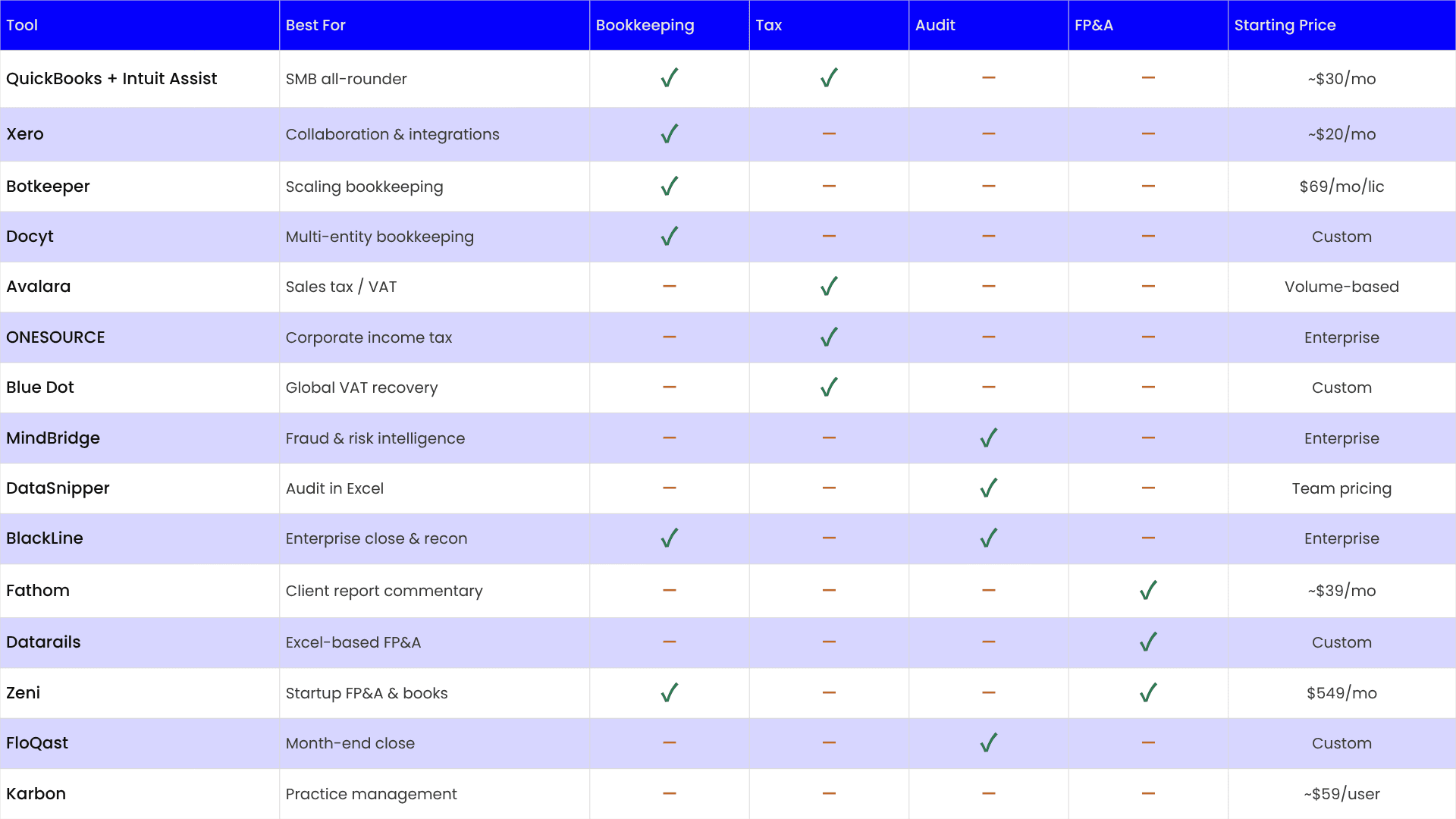
Accounting Tools Side by side Comparison
Use this table to quickly match your specific need to the right tool.
| Tool | Best For | Bookkeeping | Tax | Audit | FP&A | Starting Price |
| QuickBooks + Intuit Assist | SMB all-rounder | ✓ | ✓ | – | – | ~$30/mo |
| Xero | Collaboration & integrations | ✓ | – | – | – | ~$20/mo |
| Botkeeper | Scaling bookkeeping | ✓ | – | – | – | $69/mo/lic |
| Docyt | Multi-entity bookkeeping | ✓ | – | – | – | Custom |
| Avalara | Sales tax / VAT | – | ✓ | – | – | Volume-based |
| ONESOURCE | Corporate income tax | – | ✓ | – | – | Enterprise |
| Blue Dot | Global VAT recovery | – | ✓ | – | – | Custom |
| MindBridge | Fraud & risk intelligence | – | – | ✓ | – | Enterprise |
| DataSnipper | Audit in Excel | – | – | ✓ | – | Team pricing |
| BlackLine | Enterprise close & recon | ✓ | – | ✓ | – | Enterprise |
| Fathom | Client report commentary | – | – | – | ✓ | ~$39/mo |
| Datarails | Excel-based FP&A | – | – | – | ✓ | Custom |
| Zeni | Startup FP&A & books | ✓ | – | – | ✓ | $549/mo |
| FloQast | Month-end close | – | – | ✓ | – | Custom |
| Karbon | Practice management | – | – | – | – | ~$59/user |
How to choose the right AI tool for your firm
Most “best AI tools” lists throw 30 options at you without context. Here is a practical framework for making the decision.
#1 Start with your biggest time drain
Is it month-end reconciliation? Tax filing? Client reporting? Pick the one workflow that costs your firm the most hours and start there. AI has the highest ROI when targeted at a specific bottleneck, not deployed everywhere at once.
#2 Match firm size to tool type
Small firms (1–5 CPAs): QuickBooks + Fathom or Karbon is usually sufficient. Mid-sized firms: specialist tools like FloQast or Botkeeper start to make sense. Large firms and enterprises: BlackLine, ONESOURCE, or MindBridge are built for your scale.
#3 Check your existing stack first
Most AI tools work best when embedded into what you already use. If you’re on QuickBooks, start with Intuit Assist. On NetSuite? Look at Netgain. On Excel? DataSnipper or Datarails. Switching your core platform is high-risk — layer AI on top first.
#4 Demand a free trial with your real data
Never buy AI accounting software without testing it on a sample of your actual client data. Accuracy claims vary dramatically between demos and real-world use. Most reputable tools will offer a proof-of-concept period.
#5 Verify compliance and security
Any tool handling client financial data needs SOC 2 Type II certification, GDPR compliance (if serving EU clients), full audit trails, and clear data residency policies. Never skip this step — a data breach can end a firm.
Key insight
The right use of AI often comes down to business size and complexity. Don’t buy a Ferrari when you need a reliable sedan. Start narrow, prove the ROI, then expand.
Risks and limitations to know before you buy
AI tools are powerful but not perfect. Here are the real risks every accountant should understand before committing to a platform.
Hallucination and accuracy risk
General AI tools like ChatGPT have hallucination rates of 15–20% on complex queries. For accounting work — where a wrong number can mean a penalty or an audit — this is unacceptable. Always use specialist accounting AI, not general-purpose chatbots, for anything that touches client financials. Verify AI outputs before filing or presenting to clients.
Over-reliance and professional judgement
AI lacks emotional intelligence, ethical reasoning, and contextual understanding. It cannot replace the professional judgement that experienced accountants apply to complex situations. Use AI to handle the routine so you have more time for the strategic — not to bypass professional oversight entirely.
Data privacy and security
Financial data is among the most sensitive data that exists. Before deploying any AI tool, verify: Is it SOC 2 Type II certified? Where is your data stored? Does it use your client data to train its models? Who has access? These are non-negotiable questions with every vendor.
Regulatory and compliance uncertainty
AI-generated tax filings and financial statements must still meet the same professional standards as manually prepared documents. You — the accountant — remain legally responsible for the output, regardless of what the AI produced. Build human review checkpoints into every AI-assisted workflow.
Important
AI will not replace accountants. It will replace accountants who don’t use AI. The profession is shifting from manual execution to strategic oversight — those who embrace that shift will thrive.
Frequently asked questions
Will AI replace accountants?
No. AI lacks the professional judgement, ethical reasoning, and client relationship skills that define the accounting profession. What AI is doing is automating the routine work — data entry, reconciliation, basic tax prep — so accountants can focus on advisory, strategy, and higher-value client work. The role is evolving, not disappearing. Globally, 92% of accounting professionals are now using AI as a tool, not being replaced by it.
What is the best AI tool for a small accounting firm?
For most small firms (under 10 CPAs), QuickBooks Online with Intuit Assist covers bookkeeping, payroll, and basic tax automation at an accessible price point. Layer in Fathom for client reporting commentary and Karbon for practice management — those three tools cover the vast majority of a small firm’s workflow needs without enterprise complexity or cost.
How much do AI accounting tools cost?
Pricing ranges enormously: SMB tools like Xero start at ~$20/month. Mid-market specialists like Botkeeper run $69/month per license. FP&A tools like Zeni start at $549/month. Enterprise platforms like BlackLine, ONESOURCE, and MindBridge run on multi-year contracts that can reach $20,000–$100,000+ per year. Always factor in implementation costs, training time, and integration work when comparing.
Can I use ChatGPT for accounting work?
ChatGPT and general AI assistants are useful for drafting client emails, summarising documents, explaining concepts, and research. They are not appropriate for actual accounting work — they cannot integrate with your accounting software, cannot process your clients’ bank statements, and have hallucination rates too high for financial accuracy requirements. Use specialist accounting AI for the numbers, and general AI for communication tasks.
How long does it take to see ROI from AI tools?
82% of early AI adopters in accounting report positive ROI within the first year. Gartner research shows an average of 5.4 hours saved per week per employee. For a firm billing $200/hour with 5 employees, that’s over $280,000 in recovered time annually — before you account for reduced errors, faster close cycles, and the ability to take on more clients without adding headcount.
Is my client data safe with AI accounting tools?
Reputable AI accounting platforms maintain SOC 2 Type II certification, GDPR compliance, and comprehensive audit trails. Before deploying any tool, ask the vendor specifically: whether they train their models on your data, where data is stored, who has access, and what their breach notification policy is. Never deploy a tool that doesn’t have clear written answers to these questions.